UK expense software that connects to Quickbooks
Streamline your accounts solutions today.


Trusted by many happy customers




ExpenseIn + Quickbooks = Accounting success
Quickbooks is a cloud-based accounting software, ideally suited for small to medium-sized companies who want to keep track of the financial health of their businesses. It can be used for invoicing customers, paying bills, generating reports, and preparing taxes.
Integrating ExpenseIn with Quickbooks is a simple one-time process and time-consuming data entry will become a thing of the past!

Keep ExpenseIn synced with Quickbooks
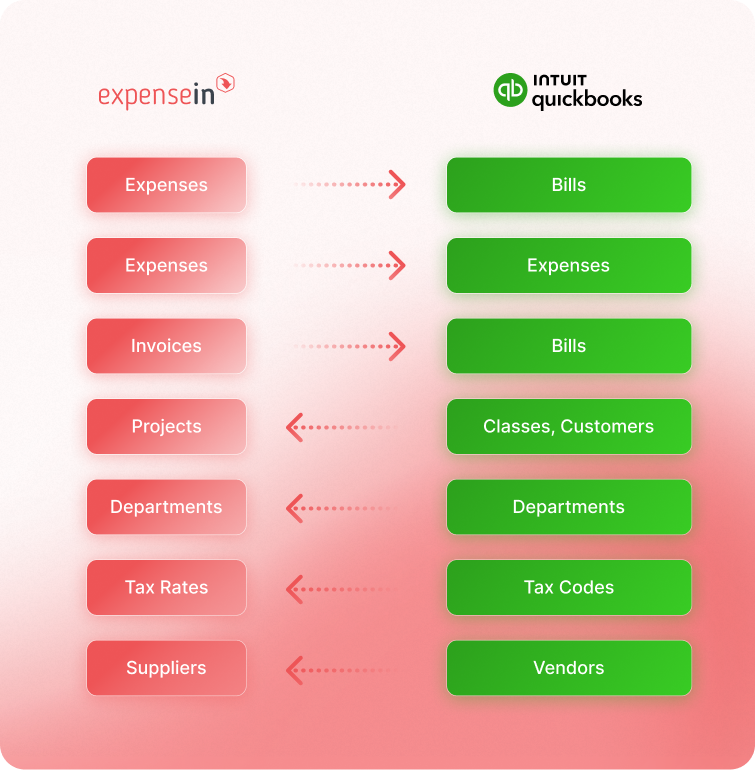
When your QuickBooks accounts, departments, customers, vendors, classes, or tax codes change, ExpenseIn can help keep your coding options up to date too.
Admins can choose which QuickBooks data to sync into ExpenseIn, then filter what comes across by name, account number, classification, or list type.
That gives teams the right options when coding expenses and invoices, while ExpenseIn can post the resulting data back into QuickBooks.
Connecting ExpenseIn to Quickbooks
Connect ExpenseIn to your Quickbooks account in 10 seconds and benefit from automatic expense and invoice posting. In many cases, our default templates work out of the box and allow you to start posting immediately.
If you need any help, the ExpenseIn Support team are also on hand and can be contacted via phone, live chat and email.
Discover more integrations



Effortless spend management for growing finance teams


Get started with ExpenseIn today
Explore our faster, simpler and smarter approach to expense management.