Sage 200 connected expense software
Streamline your expenses and accounting solutions today. Reduce the time spent recording and managing business expenses by integrating ExpenseIn with Sage 200.


Trusted by many happy customers




ExpenseIn + Sage 200 app = Accounting success
Sage 200 is a cloud-based accounting solution for medium-sized enterprises that are looking for a solution that meets the accounts requirements of growing businesses. Sage 200 is ideal for businesses with £2M-£100M annual turnover, or 50-250 employees. It can be customised to fit your business needs by managing stock, projects, CRM, payments and your manufacturing processes.
Integrating ExpenseIn with Sage 200 is a simple one-time process and time-consuming data entry to manage business receipts will become a thing of the past!

Keeping ExpenseIn synced with Sage 200
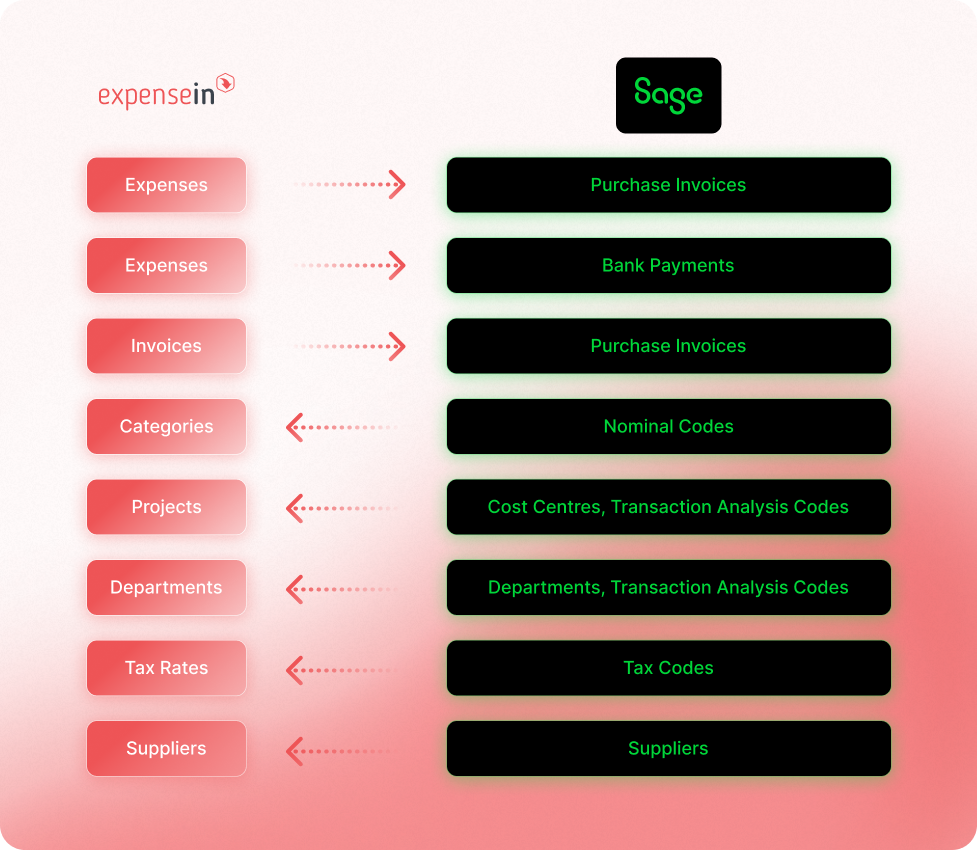
Sage 200 teams often manage coding across nominal codes, cost centres, departments, transaction analysis codes, tax codes, and suppliers.
With ExpenseIn, admins can sync selected Sage 200 reference data into ExpenseIn, then filter what comes through by name, code, description, or supplier reference.
That helps teams code expenses and invoices using the right Sage 200 records, while ExpenseIn can post expense and invoice data back into Sage 200.
Connecting ExpenseIn to Sage 200
Connect ExpenseIn to your Sage 200 account in 10 seconds and benefit from automatic expense posting. In many cases, our default templates work out of the box and allow you to start posting receipts and invoices immediately.
If you need any help with your Sage 200 integration, the ExpenseIn Support team are also on hand and can be contacted via phone, live chat and email.
Discover more integrations



Effortless spend management for growing finance teams


Get started with ExpenseIn today
Explore our faster, simpler and smarter approach to expense management.