Sage Intacct connected expense software
Streamline your expenses and accounting solutions today. Reduce the time spent recording and managing business expenses by integrating ExpenseIn with Sage Intacct.

Trusted by many happy customers




ExpenseIn + Sage Intacct app = Accounting success
Sage Intacct is a cloud-based accounting platform for growing businesses that are looking for an innovative solution.
Sage Intacct is ideal for companies that want a finance software for an unlimited number of users. Sage Intacct offers a wide range of sophisticated features to manage all aspects of accounts and automates tedious processes to free team members.
Sage Intacct prouds itself on integrating seamlessly with any business platforms. Integrating ExpenseIn with Sage Intacct is a simple one-time process and time-consuming data entry to manage business receipts will become a thing of the past!

Keep ExpenseIn synced with Sage Intacct
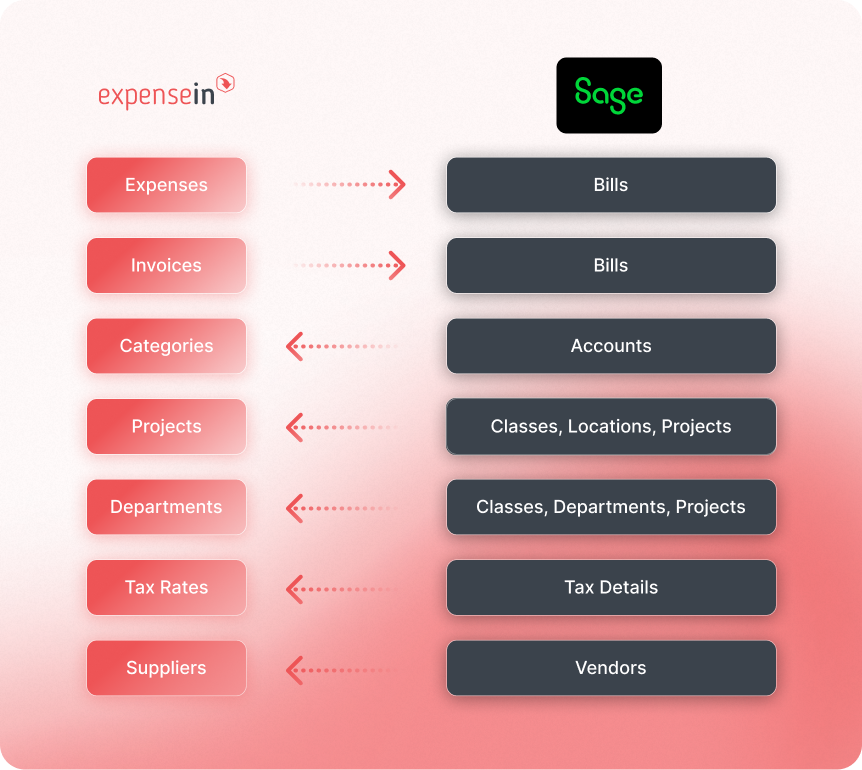
Growing finance teams need their coding data to stay accurate across accounts, departments, locations, projects, classes, tax details, and vendors.
With ExpenseIn, admins can sync selected Sage Intacct reference data into ExpenseIn and then filter what comes through by title, name, account number, category, or tax solution.
So, when teams code expenses and invoices, they’re working from the right Sage Intacct lists, while ExpenseIn can send the relevant expense and invoice data back into the accounting system.
Discover more integrations



Effortless spend management for growing finance teams


Get started with ExpenseIn today
Explore our faster, simpler and smarter approach to expense management.